HashiCorp Vault — From Zero to Hero
A DIY success story from a team adopting HashiCorp Vault for Kubernetes Secrets Management
Introduction
This is a fictional story of a team that got ripped apart after a security audit for hardcoding database credentials in plaintext for their web app.
Read how they went in 5 steps from no secrets management solution at all to a dynamic, scalable, and secure workflow using HashiCorp Vault.
In this blog post, we will cover the following topics:
- Configuring Vault AppRole authentication
- Setting up and using the External Secrets Manager
- Configuring Vault Kubernetes authentication
- Setting up and using the Vault Secrets Operator
- Setting up and using the Vault Agent Injector
- Configuring Vault's Database secrets engine for Postgres
The Application
First, we need to talk about the application that is going to be used in this blog post.
The application itself is fairly simple, with ~100LOC.
It is a web app that takes a couple of environment variables (DB_HOST, DB_PORT, DB_USER, DB_PASSWORD and DB_NAME) and connects to a Postgres database.
It then displays the credentials and the connection status on a web server running on port 9090.
The app is containerized (falcosuessgott/vault-from-zero-to-hero), meaning it will be deployed as a Deployment in a Kubernetes cluster.
Once the demo-app is deployed and working with the provided Postgres credentials, the web server will respond with a short status message and return 200 (OK) or 500 (error):
> curl localhost:9090
DB: 127.0.0.1:5432
User: postgres
Password: P@ssw0rd
Ping: success
This demo-app will be used throughout this post to demonstrate how the database credentials have been obtained and provided to the application.
How to work this blog post
You are welcome to perform all the steps mentioned here by yourself.
I will describe how to set up all components and perform all configurations locally using docker and kind.
TL;DR
If you're too lazy to follow the instructions, just check out the E2E Github Action pipelines that run all the steps mentioned in this blog post (navigate to the deploy step).
Prerequisites
To follow the instructions, you will need the following tools installed:
dockerkubectlkindvaulthelmcurljq
Repository
All required scripts and configuration are available in this repository. You can simply clone it:
> git clone https://github.com/clear-route/hashicorp-vault-from-zero-to-hero.git
> cd hashicorp-vault-from-zero-to-hero
The Makefile contains all required commands to spin up each part for your convenience:
> make help
clean                          clean up all resources
help                           list makefile targets
infra                          start all infra components
kind                           start a local kind cluster
part-00                        run status-quo - hardcoded credentials
part-01                        run part 01 - esm with token auth
part-02                        run part 02 - esm with approle auth
part-03                        run part 03 - esm with k8s auth
part-04                        run part 04 - vso with dynamic db credentials
part-05                        run part 05 - vai with dynamic db credentials injected during runtime
postgres                       start postgres container
vault                          start vault container
Kubernetes
We will need a local Kubernetes cluster.
For this blog post, I will use kind, but you're free to go with whatever Kubernetes distribution you're prefer and have access to.
If you're using kind, you can use the following script to spin up a kind cluster:
# scripts/setup-kind.sh

# Start a Kubernetes cluster using KinD
kind create cluster \
	--name vault-from-zero-to-hero \
	--config manifests/kind-config.yml
Once setup. kubectl get ns should succeed:
> kubectl get ns
NAME                 STATUS   AGE
default              Active   30s
kube-node-lease      Active   30s
kube-public          Active   30s
kube-system          Active   30s
local-path-storage   Active   25s
Postgres
We will also need a Postgres database. The following command, spins up a local postgres database:
# scripts/setup-postgres.sh

# Start a postgres container
docker run -d --rm \
	--name postgres \
	-p 5432:5432 \
	-e POSTGRES_USER=postgres \
	-e POSTGRES_PASSWORD=P@ssw0rd \
	-e POSTGRES_DB=vault \
	postgres
Vault
Lastly, a Vault instance is required. I will use the Vault docker container, with a predefined Vault token for simplicity:
# scripts/setup-vault.sh

# Start Vault Container
docker run -d --rm \
	--add-host host.docker.internal:host-gateway \
	--cap-add=IPC_LOCK \
	--name vault \
	-p 8200:8200 \
	-e VAULT_DEV_ROOT_TOKEN_ID=root \
	-e VAULT_DEV_LISTEN_ADDRESS=0.0.0.0:8200 \
	hashicorp/vault
Once you set the Vault environment vars:
export VAULT_ADDR="http://127.0.0.1:8200"
export VAULT_TOKEN="root"
a vault status should return a healthy Vault instance:
> vault status
Key             Value
---             -----
Seal Type       shamir
Initialized     true
Sealed          false
Total Shares    1
Threshold       1
Version         1.18.3
Build Date      2024-12-16T14:00:53Z
Storage Type    inmem
Cluster Name    vault-cluster-0107973c
Cluster ID      e39a93ab-6eda-1223-4894-0f7a6c867776
HA Enabled      false
Cleanup
If you`ve hit a dead-end, you can always reset your local environment:
# scripts/cleanup.sh

# Delete kind cluster
kind delete cluster --name vault-from-zero-to-hero

# Stop and remove docker images
docker stop vault postgres
docker rm vault postgres
Status Quo: Hardcoded Static Credentials in Plaintext
Alright, we're good to go. The status quo for our fictional app-team and their secrets management could not be worse and Im not even kidding - Never do this - not even in development.
The team simply provided the database credentials to their App by specifying the required environment variables in the Deployment manifest:
# manifests/demo-app-hardcoded.yaml
apiVersion: apps/v1
kind: Deployment
metadata:
  name: demo-app
  labels:
    app: demo-app
spec:
  replicas: 1
  selector:
    matchLabels:
      app: demo-app
  template:
    metadata:
      labels:
        app: demo-app
    spec:
      containers:
        - name: vault-from-zero-to-hero
          image: falcosuessgott/vault-from-zero-to-hero
          ports:
            - containerPort: 9090
          env:
            - name: DB_HOST
              value: "172.17.0.1"
            - name: DB_PORT
              value: "5432"
            - name: DB_USER
              value: postgres
            # This is bad - do not do this!
            - name: DB_PASSWORD
              value: P@ssw0rd
            - name: DB_NAME
              value: vault
Regardless, of the security concerns - the demo-app works as expected.
Once deployed, we can see a database connection was successfully established using the provided credentials:
> kubectl apply -f manifests/demo-app-hardcoded.yaml
> kubectl exec $(kubectl get po -l app=demo-app -o jsonpath='{.items[*].metadata.name}') -- curl --fail-with-body -s localhost:9090
DB: 172.17.0.1:5432
User: postgres
Password: P@ssw0rd
Ping: success
To no one's surprise, during an audit, the security team found the hardcoded credentials in their Git Repository and flagged the application.
This is where our story of adopting HashiCorp Vault begins.
Part 01: Static Credentials from HashiCorp and the External Secrets Manager - [⭐]
After the audit, the team was no longer allowed to hardcode the database credentials in plaintext Kubernetes manifests.
They needed to find a secrets management solution. Luckily the Infrastructure team already maintains a HashiCorp Vault cluster for internal use.
The team did some research about Vault and learned, that they can store the database credentials in Vaults KVv2 secrets engine.
After getting access to Vault a team member put the credentials in the already existing Kvv2 engine secrets:
# write secrets to Vault
> vault kv put secret/database/postgres username=postgres password=P@ssw0rd
======== Secret Path ========
secret/data/database/postgres

======= Metadata =======
Key                Value
---                -----
created_time       2025-01-05T22:49:52.814816755Z
custom_metadata    <nil>
deletion_time      n/a
destroyed          false
version            1

# list all secrets in KV engine
> vkv export -p secret --show-values
secret/ [desc=key/value secret storage] [type=kv2]
└── database
    └── postgres [v=1]
        ├── password=P@ssw0rd
        └── username=postgres
Now all they had to do, was to populate the Vault KVv2 secret into a Kubernetes secret, right?
After some more researching the app-team found out about the External Secrets Manager (ESM) - a Kubernetes operator that synchronizes Kubernetes Secrets from various Provider, such as HashiCorp Vault.
Setup External Secrets Manager
The installation was fairly easy. They simply had to use the helm chart to install the operator:
# scripts/setup-esm.sh

# add the ESM helm chart repo
helm repo add external-secrets https://charts.external-secrets.io

# fetch the charts
helm repo update

# install the ESM helm chart
helm install external-secrets \
   external-secrets/external-secrets \
    -n external-secrets \
    --create-namespace \
    --set installCRDs=true

# wait for the ESM pods to be ready
kubectl wait \
   --for=condition=ready pod \
   -l app.kubernetes.io/instance=external-secrets \
   --timeout=180s \
   -n external-secrets
Then, according to the docs, a CRD of type SecretStore that specifies the connection to the Vault and the path to the KVv2 secrets engine was required:
# manifests/esm-secret-store-token.yml
apiVersion: external-secrets.io/v1beta1
kind: SecretStore
metadata:
  name: vault-backend
spec:
  provider:
    vault:
      server: http://172.17.0.1:8200
      path: secret
      version: v2
      auth:
        tokenSecretRef:
          name: vault-token
          key: token
---
apiVersion: v1
kind: Secret
metadata:
  name: vault-token
data:
  token: cm9vdA== # "root"
Lastly, an ExternalSecret CRD was required that references the SecretStore and specifies the Kvv2 secret to be synchronized to a Kubernetes secret:
# manifests/esm-external-secret.yml
apiVersion: external-secrets.io/v1beta1
kind: ExternalSecret
metadata:
  name: postgres-creds
spec:
  refreshInterval: "1h"
  secretStoreRef:
    name: vault-backend
    kind: SecretStore
  target:
    name: postgres-creds
  data:
    - secretKey: username
      remoteRef:
        key: database/postgres
        property: username
    - secretKey: password
      remoteRef:
        key: database/postgres
        property: password
Once the manifests were applied, they could see that indeed Kubernetes Secret named postgres-creds was populated containing the database credentials from Vault:
> kubectl get secret postgres-creds -o json | jq '.data | map_values(@base64d)'
{
  "password": "P@ssw0rd",
  "username": "postgres"
}
This is already looking good! Now, all that was left to do, was to reference the postgres-creds secret in the applications deployment manifest using envFrom:
# manifests/demo-app-k8s-secret.yaml
apiVersion: apps/v1
kind: Deployment
metadata:
  name: demo-app
  labels:
    app: demo-app
spec:
  replicas: 1
  selector:
    matchLabels:
      app: demo-app
  template:
    metadata:
      labels:
        app: demo-app
    spec:
      containers:
        - name: vault-from-zero-to-hero
          image: falcosuessgott/vault-from-zero-to-hero
          ports:
            - containerPort: 9090
          env:
            - name: DB_HOST
              value: "172.17.0.1"
            - name: DB_PORT
              value: "5432"
            - name: DB_USER
              valueFrom:
                secretKeyRef:
                  name: postgres-creds
                  key: username
            - name: DB_PASSWORD
              valueFrom:
                secretKeyRef:
                  name: postgres-creds
                  key: password
            - name: DB_NAME
              value: vault
And ... et voila the demo-app is up and running and successfully connecting to the postgres DB using the credentials stored in Vault:
> kubectl apply -f manifests/demo-app-k8s-secret.yaml
> kubectl exec $(kubectl get po -l app=demo-app -o jsonpath='{.items[*].metadata.name}') -- curl --fail-with-body -s localhost:9090
DB: 172.17.0.1:5432
User: postgres
Password: P@ssw0rd
Ping: success
The team was happy, they adopted Vault as Secrets Management Solution and no longer had to hardcode the database credentials in the demo-app manifest.
All the findings from the audit were resolved and the team could focus on developing new features ... right?
Part 02: Static Credentials from HashiCorp Vault using Approle Auth and the External Secrets Manager - [⭐⭐]
Well not really, after a follow-up with the Security team, it was brought up that now they don't hardcode the postgres credentials anymore, but they have the base64 encoded Vault token in the SecretStore CRD and even worse, that token has access to far more secrets than required ...
The app-team wasn't done yet. They worked together with the Infrastructure team to come up with a more secure Vault authentication workflow and decided to use the Approle authentication method.
Setup Vault Approle authentication
Approle is a authentication method that allows machines or apps to authenticate with Vault using a role-id and secret-id.
The Vault-team provided them with the Approle credentials bound to a postgres policy, which once authenticated, would have read-only access to the database/postgres path, where the postgres credentials have been stored:
# scripts/setup-vault-approle-auth.sh

# enable approle auth
vault auth enable approle

# create a policy for the database credentials
vault policy write approle - <<EOF
path "secret/data/database/postgres" {
    capabilities = ["read"]
}
EOF

# create a role using the postgres policy
vault write auth/approle/role/postgres \
    token_ttl=1h \
    token_policies=approle

# get the role-id
ROLE_ID=$(vault read -format=json auth/approle/role/postgres/role-id | jq -r ".data.role_id")

# get the secret-id
SECRET_ID=$(VAULT_FORMAT=json vault write -f auth/approle/role/postgres/secret-id | jq -r ".data.secret_id")

# create a secret for the approle
kubectl create secret generic vault-approle \
  	--from-literal=role-id="${ROLE_ID}" \
  	--from-literal=secret-id="${SECRET_ID}"
The team updated the SecretStore CRD to now use the AppRole authentication:
# manifests/esm-secret-store-approle.yml
apiVersion: external-secrets.io/v1beta1
kind: SecretStore
metadata:
  name: vault-backend
spec:
  provider:
    vault:
      server: http://172.17.0.1:8200
      path: secret
      version: v2
      auth:
        appRole:
          roleRef:
            name: vault-approle
            key: role-id
          secretRef:
            name: vault-approle
            key: secret-id
The demo-app manifest remained the same. As we can see, migrating to Approle auth worked as expected:
> kubectl apply -f manifests/demo-app-k8s-secret.yaml
> kubectl exec $(kubectl get po -l app=demo-app -o jsonpath='{.items[*].metadata.name}') -- curl --fail-with-body -s localhost:9090
DB: 172.17.0.1:5432
User: postgres
Password: P@ssw0rd
Ping: success
The team again sought feedback from the Security team, thinking they resolved all remaining concerns about the hardcoded token.
While security was happy they now use an authentication method which would return a Vault token with read-only access to the database/postgres path, they still had concerns about the hardcoded Approle credentials in the vault-approle Kubernetes secret.
Part 03: Static Credentials from HashiCorp Vault using Kubernetes Auth and the External Secrets Manager - [⭐⭐⭐]
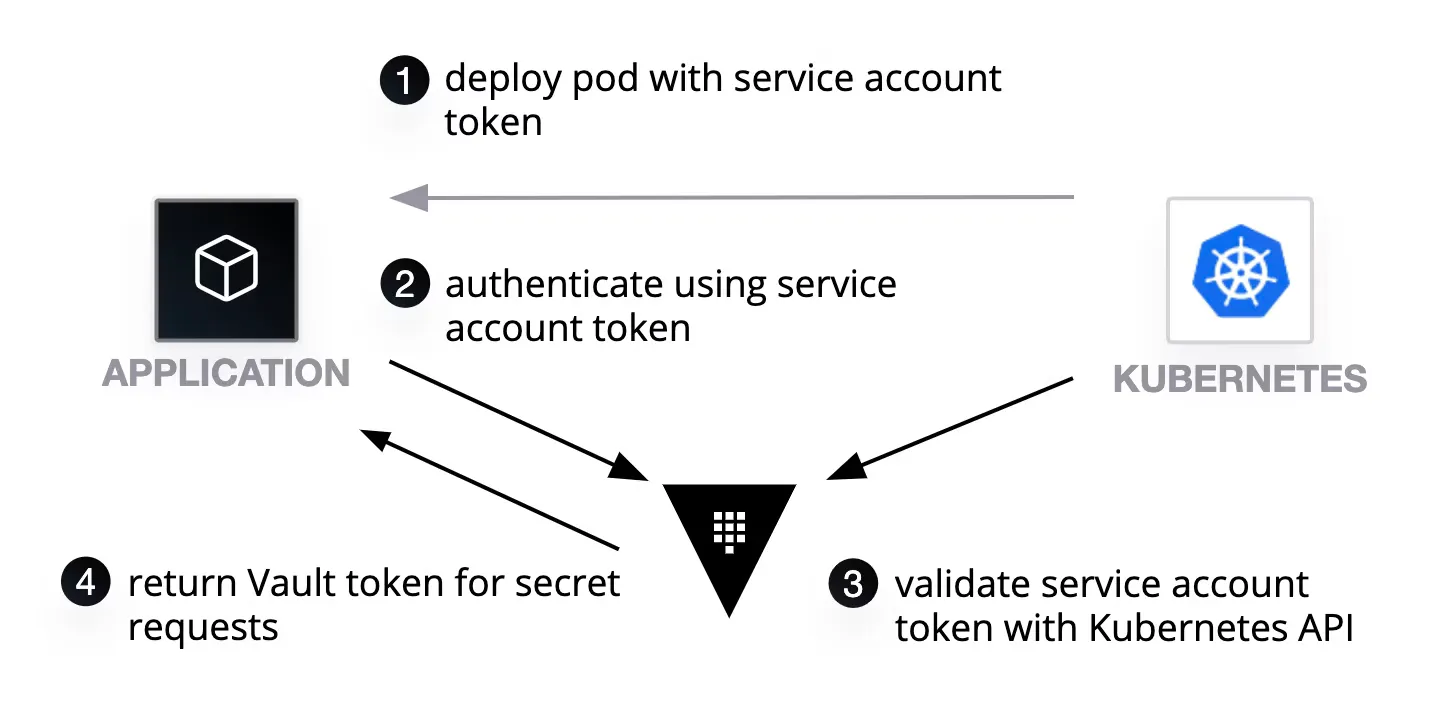
The app-team had to find something else ... The Infrastructure team informed them about Vaults Kubernetes authentication method, which essentially uses Kubernetes Service Account Token to authenticate to Vault.
This way, they would no longer have to hardcode any credentials:
Setup Vault Kubernetes authentication
The app-team went and created a vault-auth Kubernetes Service Account, with permissions to review other Service Accounts using the system:auth-delegator role.
This Service account would be used by Vault to verify and validate other Service Account Tokens:
# manifests/vault-crb.yml
apiVersion: v1
kind: ServiceAccount
metadata:
  name: vault-auth
automountServiceAccountToken: true
---
apiVersion: v1
kind: Secret
metadata:
  name: vault-auth-token
  annotations:
    kubernetes.io/service-account.name: vault-auth
type: kubernetes.io/service-account-token
---
apiVersion: rbac.authorization.k8s.io/v1
kind: ClusterRoleBinding
metadata:
  name: role-tokenreview-binding
  namespace: default
roleRef:
  apiGroup: rbac.authorization.k8s.io
  kind: ClusterRole
  name: system:auth-delegator
subjects:
- kind: ServiceAccount
  name: vault-auth
  namespace: default
The Kubernetes auth method was quickly setup for the app-teams Kubernetes cluster.
They also configured a Kubernetes auth role esm which is bound to the postgres policy:
# scripts/setup-vault-k8s-auth.sh

# enable kubernetes auth method
vault auth enable kubernetes

# create a policy
vault policy write postgres - <<EOF
path "secret/data/database/postgres" {
    capabilities = ["read"]
}
EOF

# Get the service account token and CA cert
K8S_JWT_TOKEN=$(kubectl get secret vault-auth-token -o jsonpath="{.data.token}" | base64 -d)
K8S_CA_CERT=$(kubectl get secret vault-auth-token -o jsonpath="{['data']['ca\.crt']}" | base64 -d)

# configure the kubernetes auth method
vault write auth/kubernetes/config \
    token_reviewer_jwt="$K8S_JWT_TOKEN" \
    kubernetes_host=https://host.docker.internal:6443 \
    kubernetes_ca_cert="$K8S_CA_CERT"

# create a kubernetes role
vault write auth/kubernetes/role/esm \
    bound_service_account_names=vault-auth \
    bound_service_account_namespaces=default \
    policies=postgres \
    ttl=1h
Setup External Secrets Manager
Again, they updated the SecretStore CRD to now use Kubernetes auth:
# manifests/esm-secret-store-k8s.yml
apiVersion: external-secrets.io/v1beta1
kind: SecretStore
metadata:
  name: vault-backend
spec:
  provider:
    vault:
      server: http://172.17.0.1:8200
      path: secret
      version: v2
      auth:
        kubernetes:
          role: esm
          serviceAccountRef:
            name: vault-auth
          secretRef:
            name: vault-auth-token
            key: token
The demo-app manifest remained the same. After applying all manifests, the demo-app was up and running!:
> kubectl apply -f manifests/demo-app-k8s-secret.yaml
> kubectl exec $(kubectl get po -l app=demo-app -o jsonpath='{.items[*].metadata.name}') -- curl --fail-with-body -s localhost:9090
DB: 172.17.0.1:5432
User: postgres
Password: P@ssw0rd
Ping: success
This was great! Not only they consumed the postgres credentials from Vault, they also managed to authenticate completely dynamic to Vault using the Kubernetes Service accounts.
They no longer had to hardcode any static credentials in any manifests!
Part 04: Dynamic Database credentials using the Vault Secrets Operator - [⭐⭐⭐⭐]
The app-team was hooked. They saw the advantage of adopting HashiCorp Vault and how it improved not only the security but also the time it took to securely deploy applications, not having to worry about secrets anymore.
They wanted to further improve the workflow and learned about the Database secrets engine. and figured, now where they are already authenticated to Vault, why not use dynamic credentials for the postgres database as well?
Setup Vault Database secret engine
The database secrets engine, is able to automatically generate and revoke credentials for various databases, such as postgres:

The Infrastructure team enabled the secrets engine and configured the app-teams database in Vault (demo-app-db) and provided them with a postgres role:
# scripts/setup-vault-db.sh

# enable database secrets engine
vault secrets enable database

# create a database
vault write database/config/demo-app-db \
    plugin_name="postgresql-database-plugin" \
    allowed_roles="postgres" \
    connection_url="postgresql://{{username}}:{{password}}@host.docker.internal:5432/vault" \
    username="postgres" \
    password="P@ssw0rd"

# create a role
vault write database/roles/postgres \
    db_name="demo-app-db" \
    creation_statements="CREATE ROLE \"{{name}}\" WITH LOGIN PASSWORD '{{password}}' VALID UNTIL '{{expiration}}'; \
        GRANT SELECT ON ALL TABLES IN SCHEMA public TO \"{{name}}\";" \
    default_ttl="1h" \
    max_ttl="24h"
Thy tested the connection and were able to generate short-lived postgres credentials using Vault:
> vault read database/creds/postgres
Key                Value
---                -----
lease_id           database/creds/postgres/74nOvKCmV6BNUjy5iWE22u4Z
lease_duration     1h
lease_renewable    true
password           89ZYmtT2qgS-OG7Avi2T
username           v-token-postgres-Zv02fNPCyfXg5gzM3Jzb-1736064877
Setup Vault Secrets Operator
But there was one problem... The External Secrets Manager does not work for dynamic secrets, only for KV secrets...
Luckily, the team found out about the Vault Secrets Operator (VSO) a native Vault operator provided by HashiCorp:

They installed the VSO using Helm:
# scripts/setup-vso.sh

# install the VSO Helm chart
helm repo add hashicorp https://helm.releases.hashicorp.com

# fetch charts
helm repo update

# install the VSO Helm chart
helm install \
    --version 0.9.1 \
    --create-namespace \
    --namespace vso \
    vso hashicorp/vault-secrets-operator

# wait for the VSO pods to be ready
kubectl wait \
   --for=condition=ready pod \
   -l app.kubernetes.io/instance=vso \
   --timeout=180s \
   -n vso

# create a policy
vault policy write vso - <<EOF
path "database/creds/postgres" {
    capabilities = ["read"]
}
EOF

# create a kubernetes role
vault write auth/kubernetes/role/vso \
    bound_service_account_names=vault-auth \
    bound_service_account_namespaces=default \
    policies=vso \
    ttl=1h
and defined a VaultConnection CRD pointing to the Vault server, a VaultAuth CRD defining the used authentication method and VaultDynamicSecret for creating a Kubernetes secret dynamic-db-postgres-creds from the database secrets engine:
# manifests/vso.yaml
apiVersion: secrets.hashicorp.com/v1beta1
kind: VaultConnection
metadata:
  name: vault-connection
spec:
  address: http://172.17.0.1:8200
  skipTLSVerify: true
---
apiVersion: secrets.hashicorp.com/v1beta1
kind: VaultAuth
metadata:
  name: vault-auth
spec:
  vaultConnectionRef: vault-connection
  method: kubernetes
  mount: kubernetes
  kubernetes:
    role: vso
    serviceAccount: vault-auth
---
apiVersion: secrets.hashicorp.com/v1beta1
kind: VaultDynamicSecret
metadata:
  name: vault-postgres-creds
spec:
  vaultAuthRef: vault-auth
  mount: database
  path: creds/postgres
  destination:
    create: true
    name: dynamic-db-postgres-creds
Now they just had to update the demo-app deployment manifest to use the dynamic-db-postgres-creds created from the Vault Secrets Operator:
# manifests/demo-app-vso.yaml
apiVersion: apps/v1
kind: Deployment
metadata:
  name: demo-app
  labels:
    app: demo-app
spec:
  replicas: 1
  selector:
    matchLabels:
      app: demo-app
  template:
    metadata:
      labels:
        app: demo-app
    spec:
      containers:
        - name: vault-from-zero-to-hero
          image: falcosuessgott/vault-from-zero-to-hero
          ports:
            - containerPort: 9090
          env:
            - name: DB_HOST
              value: "172.17.0.1"
            - name: DB_PORT
              value: "5432"
            - name: DB_NAME
              value: vault
            - name: DB_USER
              valueFrom:
                secretKeyRef:
                  name: dynamic-db-postgres-creds
                  key: username
            - name: DB_PASSWORD
              valueFrom:
                secretKeyRef:
                  name: dynamic-db-postgres-creds
                  key: password
After applying, the checked the demo-app and saw that indeed now the postgres credentials were dynamically created by Vault!:
> kubectl apply -f manifests/demo-app-vso.yaml
> kubectl exec $(kubectl get po -l app=demo-app -o jsonpath='{.items[*].metadata.name}') -c vault-from-zero-to-hero -- curl --fail-with-body -s localhost:9090
DB: 172.17.0.1:5432
User: v-kubernet-postgres-ZGy2wmYeBoVJh1YVwHv2-1736122493 # user generated by vault
Password: nmeS60Lr-ygUo7mJvjOE                            # password generated by vault
Ping: success
Very cool! No hardcoded credentials required in order to authenticate to Vault and provided the demo-app with short-lived dynamic postgres credentials.
Part 05: Inject Dynamic Database credentials during runtime using the Vault Agent Injector - [⭐⭐⭐⭐⭐]
But at this point the app-team asked themselves, do we even need Kubernetes secrets at this point?
If Vault is generating the secrets, why not passing it to the demo-app deployment directly? instead of referencing a Kubernetes secret?
This can be done using the Vault Agent Injector (VAI).
A clever workflow, that when a Pod has certain Annotations defined, injects a Sidecar Container using Mutating Webhooks.
That container (its a Vault container in agent mode) then authenticates to Vault and writes the secrets to the disk, where the app container can consume it:

Setup Vault Agent Injector
The Vault Agent Injector was quickly installed using helm:
# scripts/setup-vai.sh

# install the VSO Helm chart
helm repo add hashicorp https://helm.releases.hashicorp.com

# fetch charts
helm repo update

# install the  Helm chart
helm install vai hashicorp/vault \
    --create-namespace \
    --namespace vai \
    --set="global.tlsDisable=true" \
    --set="global.externalVaultAddr=http://172.17.0.1:8200" \
    --set="injector.enabled=true" \
    --set="server.enabled=false"

# wait for the VAI pods to be ready
kubectl wait \
   --for=condition=ready pod \
   -l app.kubernetes.io/instance=vai \
   --timeout=180s \
   -n vai

# create a policy
vault policy write vai - <<EOF
path "database/creds/postgres" {
    capabilities = ["read"]
}
EOF

# create a kubernetes role
vault write auth/kubernetes/role/vai \
    bound_service_account_names=vault-auth \
    bound_service_account_namespaces=default \
    policies=vai \
    ttl=1h
All they had to do, was to define the required annotations in the demo-app manifest and make sure that the app container sources the env file containing the postgres credentials:```yaml
manifests/demo-app-vai.yaml
apiVersion: apps/v1 kind: Deployment metadata: name: demo-app labels: app: demo-app spec: replicas: 1 selector: matchLabels: app: demo-app template: metadata: labels: app: demo-app annotations: # enable the vault agent injector vault.hashicorp.com/agent-inject: "true" vault.hashicorp.com/error-on-missing-key : "true" # secrets path vault.hashicorp.com/agent-inject-secret-db-creds: "database/creds/postgres" # template vault.hashicorp.com/agent-inject-template-db-creds: | {{- with secret "database/creds/postgres" -}} export DB_USER="{{ .Data.username }}" export DB_PASSWORD="{{ .Data.password }}" {{- end }} vault.hashicorp.com/role: "vai" vault.hashicorp.com/tls-skip-verify: "true" spec: serviceAccountName: vault-auth containers: - name: vault-from-zero-to-hero image: falcosuessgott/vault-from-zero-to-hero command: - sh - -c args: # source the env vars before starting the app - source /vault/secrets/db-creds && /demo-app ports: - containerPort: 9090 env: - name: DB_HOST value: "172.17.0.1" - name: DB_PORT value: "5432" - name: DB_NAME value: vault
And once applied, like magic, the database credentials are injected during runtime, not using any `Kubernetes` secret:
```bash
> kubectl apply -f manifests/demo-app-vai.yaml
> kubectl exec $(kubectl get po -l app=demo-app -o jsonpath='{.items[*].metadata.name}') -c vault-from-zero-to-hero -- curl --fail-with-body -s localhost:9090
DB: 172.17.0.1:5432
User: v-kubernet-postgres-ZGy2wmYeBoVJh1YVwHv2-1736122493
Password: nmeS60Lr-ygUo7mJvjOE
Ping: success
They could now scale up the deployment to 5 replicas, to show that now each pod requests its own database credentials from Vault:
> kubectl scale deployment demo-app --replicas=5
> for pod in $(kubectl get po -l app=demo-app -o jsonpath='{.items[*].metadata.name}');\
  do echo $pod && kubectl exec $pod -c vault-from-zero-to-hero -- curl --fail-with-body -s localhost:9090;\
  done
demo-app-57d64bdd8f-57h5v
DB: 172.17.0.1:5432
User: v-kubernet-postgres-ZGy2wmYeBoVJh1YVwHv2-1736122493
Password: nmeS60Lr-ygUo7mJvjOE
Ping: success
demo-app-57d64bdd8f-j9w7g
DB: 172.17.0.1:5432
User: v-kubernet-postgres-MdFkJHz8XIYNHOKLkcPZ-1736122358
Password: 2AiPB8sOa-ZQD526bkbV
Ping: success
demo-app-57d64bdd8f-l46q6
DB: 172.17.0.1:5432
User: v-kubernet-postgres-0DBZTF7gMVusunpRRMBH-1736122545
Password: KMtoFRoqxfsP-oKtK3yt
Ping: success
demo-app-57d64bdd8f-t225n
DB: 172.17.0.1:5432
User: v-kubernet-postgres-JdvETwIW8NOpUaV2RJay-1736122493
Password: BCsYBuNYieO-bL2xIdxp
Ping: success
demo-app-57d64bdd8f-v87fl
DB: 172.17.0.1:5432
User: v-kubernet-postgres-E7PVaLuXZBBqGPW5I1QR-1736122545
Password: UHHPbsCF6jLzd-bC3V55
Ping: success
Where to go now from here
Why end here? The good thing about Vault is that once the authentication mechanism is in place, the possibilities are endless.
The team could now also adopt Vaults PKI secrets engine to automatically generate TLS certificates for their applications or use Vaults Transit engine to encrypt the data before writing it to the database.
Summary
And thats it! That is the end of our little fictional story of a team, that started with no secrets management solution at all and managed to migrate to a powerful, dynamic and secure workflow using HashiCorp Vault.
I hope you enjoyed this little journey and learned something. See you soon :)